
How to Find Low Competition Keywords for Your Blog

I used to think keyword research was this mysterious, velvet-rope SEO club where everyone spoke in acronyms, drank espresso shots, and stared intently at charts. Meanwhile, I was over here publishing posts I knew were helpful… and getting rewarded with the kind of traffic that could fit into a single Uber.
Then I learned something that changed everything: I did not need to “beat the internet.” I just needed to pick battles I could actually win.
That is what low competition keywords do for me. They help me rank sooner, collect those early wins that feel like rocket fuel, and slowly build the authority that makes future posts easier to rank. They also stop me from doing the internet equivalent of yelling into a pillow and hoping Google hears me.
So in this guide, I am going to walk you through exactly how I find low competition keywords, how I check if they are worth my time, how I weave them into content without sounding like a robot, and how I track performance so I can keep improving instead of just posting and praying.
1. Understanding Low Competition Keywords
What I mean when I say “low competition.”
Low competition does not mean “nobody searches for it.” If that were the goal, I could rank #1 for “how to train a goldfish to do taxes” by tomorrow.
When I say “low competition,” I mean:
- The people currently ranking are not untouchable giants.
- The current results are not perfect (or sometimes not even good).
- I can realistically create the best answer for the query.
- My blog has a fair chance of landing on page one without me needing a year of link-building and a minor miracle.
In other words, low competition is not just a number in a tool. It is a SERP reality.
Why low competition keywords feel like a shortcut
If you are building a blog, you are building momentum. And momentum is painfully hard when every post targets a keyword that is dominated by massive sites with teams, budgets, and probably an office plant named Gary who does technical SEO.
Low competition keywords give me:
- faster rankings (often)
- easier internal linking opportunities
- clearer content direction
- a way to build topical authority without burning out
Also, it is simply more fun. I like results. I like seeing posts climb. I like opening the Search Console and not feeling personally attacked.
The three types of low competition keywords I target first
Over time, I noticed that most of my “easy wins” fall into a few patterns.
1) Long-tail keywords with specific intent
These are phrases that are more detailed, more specific, and often less competitive because fewer sites create dedicated content for them.
Examples (not literal promises of low competition, just the vibe):
- “How to clean suede shoes without water stains.”
- “best email subject lines for welcome sequence”
- “How to start a budget spreadsheet for couples.”
Long-tail keywords are not automatically easy, but they usually come with two advantages:
- The intent is clearer
- The content can be more focused
And focused content is easier to make excellent.
2) Questions with weak answers ranking on page one
This is my favourite kind of keyword because it feels like finding money in a jacket pocket.
Sometimes I search for a question and find:
- posts that are thin and vague
- posts that are outdated
- posts that do not actually answer the question
- forum threads ranking because nobody has done a proper article yet
That is not a sign that the keyword is “bad.” It can be a sign that it is underserved.
3) SERPs that look a little confused
A “confused SERP” is when Google is ranking a mix of stuff because it is not entirely sure what the best result should be.
You might see:
- a short blog post
- a long guide
- a YouTube video
- a Reddit thread
- a product page that kind of fits, but not really
When I see that messy mix, I do not panic. I get excited. It can mean there is room for a well-structured, truly helpful post to take a strong position.
My non-negotiable habit: I always check the top 1–5 results
Before I commit to a keyword, I open the top 1–5 ranking pages in Google.
I am looking for four things:
Intent
Is this keyword asking for a tutorial? A list? A comparison? A definition? A template?
If I mismatch intent, I can write the greatest post in human history and still lose.
Content quality
Are the top results genuinely great, or are they just “fine”?
What is missing
I write down what they ignore, what they gloss over, and what I know I could do better.
Average word count (as a reality check)
This is important: I do not chase word count for the sake of it. I chase usefulness.
But it is smart to glance at the top 1–5 results and get a feel for the average depth.
Backlinko’s research has often been referenced for showing that top-ranking pages tend to be fairly substantial in length, while also reminding everyone that word count alone is not some magic spell. That matches what I see: longer posts often rank because they answer more, not because they are longer. If you want the deep dive, this is a helpful read:
Backlinko’s search engine ranking factors analysis.
So yes, I look at word count, but mostly to avoid publishing something obviously too thin for that SERP. If everyone ranking is writing a deep guide and I publish 700 words, I am basically showing up to a marathon in flip-flops.
2. Tools for Finding Low Competition Keywords
I use a mix of free tools and paid tools, and I do not treat any single tool as the all-knowing SEO oracle. Tools are great, but they are not Google. They are more like a friend who gives decent advice but sometimes confidently says something that makes you blink twice.
My “free first” keyword discovery routine
Google autocomplete (my lazy genius assistant)
I type a seed phrase into Google and let autocomplete do its thing.
If I type: “low competition keywords…”
Google starts finishing my sentence for me. Those suggestions are not random. They come from real searches.
I also try variations like:
- “how to…”
- “best…”
- “for beginners…”
- “without…”
- “near me…” (depending on niche)
I am basically letting the internet tell me what it wants.
People Also Ask (aka the rabbit hole)
People Also Ask is where I go when I want to expand a topic cluster.
If my seed keyword is “keyword research for blogs,” People Also Ask might reveal:
- related questions
- supporting post ideas
- Subtopics to include in my main post
It is also a sneaky way to discover long-tail terms that have real intent.
Related searches (the underrated gem)
At the bottom of Google, “Searches related to…” can be a quick map of nearby keyword opportunities.
I do not treat these as final targets. I treat them as “possible doors.” Then I open the doors and see what is inside.
Google Search Console (when my site already has some traction)
Search Console is one of the best places to find low competition opportunities because the data is yours.
My favourite play:
- Find pages getting impressions
- Look for queries where the page sits around positions 8–30
- improve the content to match those queries better
- strengthen internal links
- Sometimes, add a supporting post that targets the query directly
This is like discovering that you already have a foot in the door, and you just need to step forward.
Google Keyword Planner (rough demand clues)
Keyword Planner is built for ads, but I still use it to:
- find variations
- Get general volume signals
- Confirm that a phrase is not completely dead
I do not obsess over exact volume. I care more about intent and ranking potential.
My go-to paid tools (when I want to go fast)
Ahrefs (for difficulty clues and SERP sanity)
Ahrefs is a strong tool for:
- keyword ideas
- difficulty estimates
- SERP overviews
- competitor analysis
One thing I appreciate is that they are quite clear about how their Keyword Difficulty metric works and that it is based heavily on backlinks. It is not a perfect “difficulty detector,” but it is a useful signal. Here is their explanation: Ahrefs’ guide to keyword difficulty.
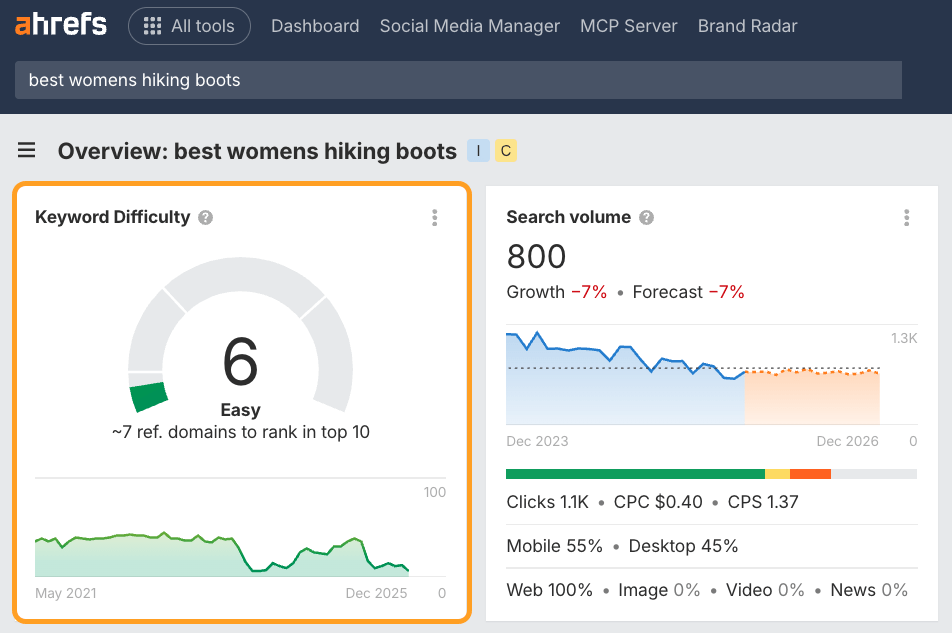
What I do in Ahrefs:
- I start with a seed keyword
- I filter for lower KD ranges
- Then I manually inspect the SERP to see if the keyword is truly “winnable” for my site
Because the truth lives in the search results, not in the tool score.
Semrush (for intent labels and competitor maps)
Semrush is great when I want:
- intent clues
- keyword difficulty estimates
- SERP feature insights
- competitor keyword gaps
Their breakdown of how keyword difficulty is calculated is also useful because it reminds you that these scores are estimates based on measurable factors like authority and referring domains. Here is a solid overview: Semrush’s keyword difficulty guide.
LowFruits-style “weak SERP” tools (when I want quick wins)
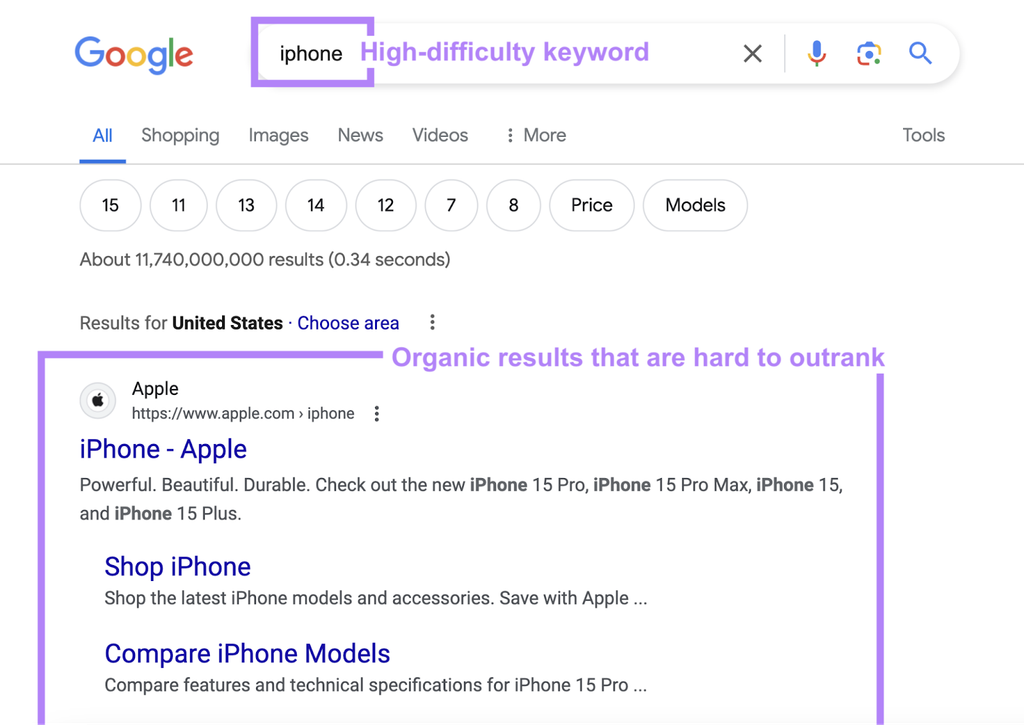
Tools that focus on identifying weak SERPs can be helpful for spotting keywords where page one is full of small sites, forums, or low-authority results.
I still manually check the SERP, but these tools can speed up the discovery phase.
Blogs and guides I actually reference (because they explain the “why”)
When I want to sharpen my keyword research approach, I revisit:
- Ahrefs’ guide to keyword difficulty
- Semrush’s keyword difficulty guide
- Backlinko’s ranking factors analysis
- Page One Power’s keyword research guide
And since we are on Blog Collabs, if you want a handy list of blogging helpers, this resource is worth bookmarking: Blog Collabs’ free blogging tools list.
3. Analyzing Keyword Profitability
Here is the trap I fell into early: I thought “low competition” automatically meant “good keyword.”
Nope.
A keyword can be easy to rank for and still do absolutely nothing for your blog goals. It can bring the wrong audience, lead to zero engagement, and make you wonder why you bothered.
So now I look at profitability through a wider lens.
What “profitability” means to me (not just money)
Sometimes profitability is money, sure. But it can also mean:
- building authority in a niche
- attracting the right audience
- Growing an email list
- driving readers to other posts
- creating trust that leads to future conversions
A post can be profitable even if it does not sell something directly, as long as it plays a strategic role.
Step 1: I label the intent (and I get brutally honest)
I put the keyword into one of these buckets:
- Informational: “how to,” “tips,” “ideas,” “what is.”
- Commercial investigation: “best,” “review,” “top,” “vs.”
- Transactional: “buy,” “discount,” “pricing.”
- Navigational: brand searches
If I want revenue, commercial investigation keywords are often more valuable, but they can also be more competitive. Informational keywords are often easier and are fantastic for building topical authority.
I love informational keywords that naturally lead into the next step, like:
- a tool recommendation
- a checklist
- a template
- a signup offer
- another supporting post
Step 2: I check the SERP for monetization pathways
I do not try to force monetization on every post. That gets weird fast. But I do ask:
- Are there products, tools, or services naturally connected to this search?
- Are ranking pages including affiliate links or product recommendations?
- Does the query suggest the reader is near a decision?
If the SERP is full of “best tools” lists, it is probably a commercial intent keyword. If it is full of definitions and how-to guides, it is likely informational.
Both can be profitable, but in different ways.
Step 3: I use CPC as a hint, not a promise
I treat CPC like a weather forecast. Helpful, but not something I would bet my life on.
If advertisers pay for clicks, there is usually business value somewhere in that topic area. It does not mean your blog will automatically make money from it, but it suggests commercial interest exists.
Step 4: I look for a “content moat”
This is where I decide if I can actually compete.
A content moat is something that makes my post hard to copy quickly, like:
- firsthand experience
- specific examples
- a clear framework
- original templates
- practical steps with detail
- expert insight that goes beyond generic advice
If the top-ranking posts are bland summaries and I can deliver a more concrete, more useful answer, that is a moat.
And no, a moat is not “I will write 3,000 words and call it a day.” A moat is “I will be the page people want to bookmark.”
Step 5: I sanity-check backlink reality
Some keywords look low competition until you notice the top-ranking pages have strong backlink profiles.
That is why I like reading how tools think about difficulty. My simple rule:
If page one is full of extremely strong sites with strong link profiles, I do not pretend I can outrun them with vibes.
Step 6: I evaluate “cluster value”
One keyword rarely changes my blog. A cluster can.
So I ask:
- Can this keyword become a pillar post?
- Are there supporting long-tail keywords around it?
- Can I build internal links that strengthen the whole topic?
If the answer is yes, that keyword is more profitable because it is a foundation stone, not a random standalone post.
4. Integrating Keywords into Your Content
This is the part where keyword research turns into actual results. Because a keyword is just a target. The content is the arrow.
And yes, I have fired plenty of arrows directly into the ground before I learned what I was doing.
I build my outline from the SERP (because Google is literally telling me what it wants)
Remember the habit of checking the top 1–5 ranking posts? This is where it pays off.
I open the top results, and I look for patterns:
- What subtopics do they cover?
- What order do they cover them in?
- What headings keep showing up?
- What questions do they answer?
Then I ask:
- What is missing?
- What could be clearer?
- What could be more actionable?
- What could be updated?
And then I built a better outline.
This is also where I do the word count reality check. I am not copying length. I am matching depth. Backlinko’s analysis is often referenced here because it points out that top results are often substantial in length while also reinforcing that word count alone is not a ranking cheat code. If you want to read that analysis, it is here: Backlinko’s search engine ranking factors.
My keyword placement approach (simple, human, and not cringe)
I do not stuff keywords into every sentence. I do not repeat the exact phrase until it loses meaning. I aim for clarity.
Here is what I do:
- Title (H1): I include the main keyword naturally.
- First paragraph: I mention the keyword once early, then focus on the problem.
- Headings (H2/H3): I use variations where they make sense.
- Body text: I write naturally, and I make sure I actually answer the query.
- Related terms: I include related phrases because they help coverage and relevance.
I am not “sprinkling” keywords like fairy dust. I am writing a page that fully covers the topic.
I treat the intro like a promise.
If someone searches “how to find low competition keywords,” they do not want a warm-up story about how the internet began.
So my intro has one job:
- Reassure the reader that they are in the right place
- Tell them what they will learn
- Get into the first actionable point quickly
If my intro rambles, my rankings can suffer, and my readers definitely suffer.
I build usefulness with a few repeatable content ingredients.
When I want a post to feel “expert-driven” instead of generic, I use:
- a clear process (step-by-step)
- real examples (even if simplified)
- common mistakes (so readers avoid them)
- decision criteria (how to choose between options)
- practical next steps (what to do today)
A post that teaches well tends to perform well, especially when it matches intent.
Internal linking is how I make one keyword turn into many wins.
When I publish a post for a low competition keyword, I immediately ask:
- What older posts can link to this?
- What supporting posts should I write next?
- Does this belong in a cluster or hub?
Internal links help readers discover more content, and they help Google understand how your pages connect. It also keeps people on your blog longer, which is generally a nice signal that your site is doing something right.
I edit for “search intent alignment,” not just grammar.
When I edit, I do not only look for typos. I look for alignment.
I ask:
- Does my post give the type of answer the SERP rewards?
- Do I answer early enough?
- Do my headings reflect what searchers want?
- Do I cover the subtopics the top results cover, plus something extra?
This is where most blog posts either become page one contenders or remain internet wallflowers.
5. Monitoring Keyword Performance
Publishing a post is not the end of the process. It is more like planting a seed. Then you water it, check it, and occasionally move it into better sunlight because you accidentally put it under the shade of a giant tree called “competition.”
The first thing I check: indexing
Within the first week or two, I check if the page is indexed. If it is not indexed, nothing else matters yet.
Then I live in Google Search Console (because it tells the truth)
Here is what I look at:
Impressions
If impressions are rising, Google is testing my page. That is a great early sign.
Average position
If I am floating around positions 8–20, I get excited, because small improvements can make a big difference there.
Click-through rate (CTR)
If impressions rise but clicks stay low, I look at:
- My title (is it clear and compelling?)
- My meta description (does it match intent?)
- My angle (am I giving people a reason to click?)
Sometimes the content is good, but the packaging is bland. And the SERP is a popularity contest. You need a good answer and a good invitation.
My 30–60–90 day pattern
This is my general rhythm:
- Around 30 days: I see what queries the post is appearing for.
- Around 60 days: I update headings, add missing subtopics, and strengthen internal links.
- Around 90 days: I decide if the keyword was truly low competition or if I need a new angle.
Sometimes I discover something funny: the post is ranking for a different query than I intended, and that query is actually better. When that happens, I lean into it. I adjust headings and content so the page becomes an even better match for what Google is already rewarding.
I track winners and build around them.
When a post starts ranking, I do not just celebrate and move on. I use it as a signal.
I ask:
- What related queries are showing up in the Search Console?
- What supporting posts could strengthen this topic?
- What questions should I answer next?
This is how low competition keywords become a content engine instead of a one-off win.
I do not panic-refresh too soon.
One of my biggest early mistakes was changing too much too quickly.
If I update a post every three days, I cannot tell what worked. I also risk confusing Google about the page.
So I make changes deliberately:
- one major improvement at a time
- wait, observe, measure
- repeat
SEO rewards patience, which is annoying, but true.
If you want to turn your blog into something brands actually want to collaborate with, and you like the idea of building traffic the strategic way (instead of the “please Google, notice me” way), you can join Blog Collabs here: Sign up for Blog Collabs.