

How to Do Keyword Research for Blog Posts – Tips & Tricks

Even in an ever-changing marketing landscape, blog posts remain highly important. Done correctly, they can help to:
- Enhance website SEO (and, increasingly, AEO)
- Build brand awareness
- Establish authority
- Generate leads
Throw in the fact that blog posts are extremely budget-friendly and can be put together relatively quickly, and it’s no surprise that they remain a much-valued part of many brands’ marketing arsenal.
With that said, simply publishing a blog post won’t yield results. Even the best, most authoritative, engaging blog posts on the planet will struggle to perform well if there’s been no consideration regarding the blog’s keywords and how they’re incorporated into the post.
After all, without sufficient keyword research, it becomes much more difficult for your intended audience to find the blog post in the first place. In this post, we’ll take a deep dive into everything you need to know about how to do keyword research for blog posts, including the best tools, how to use your competitors’ keywords to your advantage, and how to select the right keywords for your blog. Let’s dive in.
Understanding Keyword Research Basics
Keywords refer to the words and phrases that internet users use when making searches. For websites, it’s the quality of their keyword research that ensures they can pepper their blog posts with the words/phrases that their target audience is likely to be using when searching.
Why is it important?
Knowing how to do keyword research is vital because it impacts both your blog’s placement in the Search Engine Results Pages (SERPs) and its ability to speak to your target audience.
- Choose overly competitive keywords, and your post will likely appear so far down the SERPs that virtually no one sees it.
- Choose keywords that aren’t relevant to your content, and your visitors will likely hit the ‘X’ button within moments of arriving.
Good keyword research leads to keywords that tick both boxes: the right level of competitiveness that makes it possible to rank, and hyper-relevance that ensures your visitors will genuinely be interested in the contents of your blog.
Ultimately, taking the time to learn how to do keyword research for blog purposes can be a game-changer, helping to make the difference between having a blog that gathers virtual dust or one that delivers all the many benefits that blog posts can offer.
Tools for Effective Keyword Discovery
As with most things that can influence the success or failure of your website, when it comes to choosing keywords for blog posts, it’s best to let data take the lead.
You might be able to come up with keywords that you think will perform well, but you’ll get better results if there’s some science behind the decision-making process.
Luckily for all of us, there are plenty of easy-to-use, effective keyword discovery tools that you can use as a starting point. While you’ll need to perform some analysis to determine which of the keywords will be best for your needs, if you’ve been wondering how to do an initial keyword research, then these tools provide the answer!
Google Keyword Planner
Google Keyword Planner is our number one recommendation for performing initial keyword research for one simple reason: it’s an official Google tool, which means it’s directly fed by Google data.
And why’s that important? Because while we talk about the ‘Search Engine Results Pages,’ in truth, most of us are trying to get Google’s attention. It holds 90% of the search engine market share, with the next biggest, Bing, holding just 4%.
So yes, Google is King, and that makes their Keyword Planner tool valuable. Even though it was primarily designed as a PPC tool, it’s excellent for researching keywords for SEO purposes too. It can give you up-to-date keyword insights across multiple locations, including info on keyword competitiveness and volume.
It’s also free and relatively easy to use, which gives the tool two additional thumbs up from us.
Answer the Public
Answer the Public is an easy-to-use keyword research tool that offers keyword suggestions for a range of audiences, including search engines, social media, and AI models.
We found it to be highly effective for not only coming up with blog post keywords but also for blog post ideas. Take a click into the search engine part of the results page, and you’ll find keywords grouped into Questions (‘Can Coffee Beans Go Bad’). Prepositions (‘Coffee Beans Is Made From’), and Comparisons (‘Coffee Beans versus Ground Coffee’), any one of which could form the basis of a blog post.
It’s easy to use and is also excellent for seeing how search behaviour for a particular topic changes over time, which can be useful for updating your existing blogs. The free plan provides three searches per day; paid packages start from around $11/month.
Ahrefs
Using Ahrefs might be a little overkill if you’re just getting familiar with keyword research for blog posts, but if you’re serious about long-term success and have a decently-sized budget (it’s expensive), then it can be worth it.
The tool offers a ton of information about search queries, including regional volume (including how it’s split between mobile/desktop searches), global volume, keyword difficulty, and traffic potential. There’s also a lot of information about how users can select the right keywords from within the database.
But as we said, it’s steep, usually more than $100 per month for the cheapest full plan. However, there is also a ‘Starter Plan’ that runs around $29 per month, which offers access to most of its tools on a credit system (one action = one credit).
Semrush Keyword Research
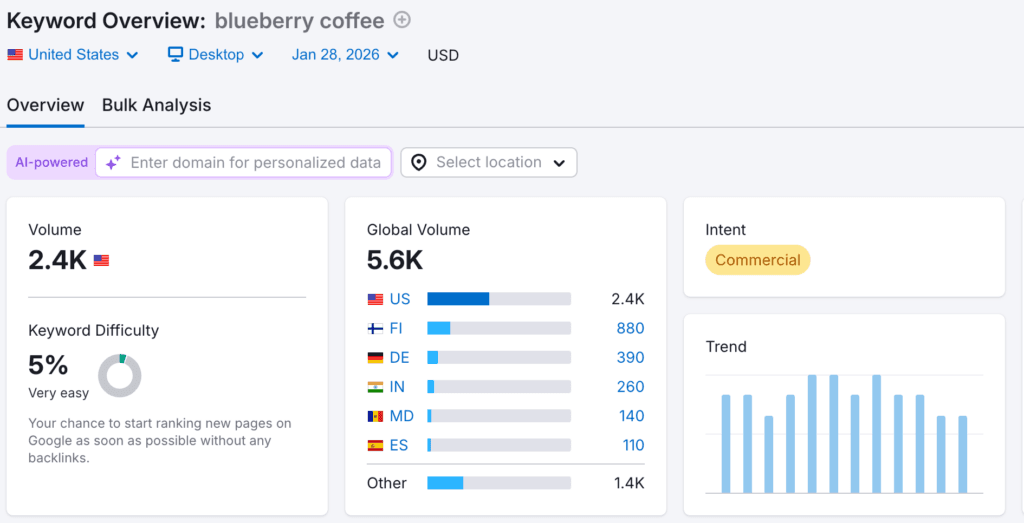
Semrush is a well-established name in the SEO world. As with Ahrefs, their all-powerful Semrush Keyword Research tool might be a little overkill, especially for novices. With that said, if you’re determined to get your blog posts onto the first page of the SERPs, then this is a tool that can help you to achieve your goal.
It offers an array of highly valuable features, including some that you won’t find in your typical keyword research tools.
- Keyword Overview: Get expert insights into keywords, including volume, intent, difficulty, number of results, competition, SERP features, and more.
- Organic Research: Optimise your keywords and find ways to rank for your competitors’ key keywords.
- Keyword Gap: See your keyword blind spots and use them in forthcoming blog posts.
And a whole lot more. It’s powerful, and, at some $140 per month, expensive. You can, however, get a free seven-day trial, which allows you to play around and see if it’s worth the investment (/snag some great keyword insights before the free trial expires).
LowFruits
Most keyword research tools focus on showing their users the high-ranking keywords for a particular topic. LowFruits does the opposite. It shows you the low-competition keywords.
Now, you might be wondering how that can help you attract visitors. Well, we’ll tell you. Low competition doesn’t mean that there’s no audience for those keywords. It just means that, for whatever reason, they haven’t yet been dominated by other websites.
That can be extremely useful for new websites that can’t realistically expect to compete with well-established websites for high-competition keywords. If you’re looking for a way to quickly rank, then you could argue that LowFruits is the best tool on this list.
It’s also pretty affordable, with plans starting from just $20.75 per month.
Moz Keyword Explorer
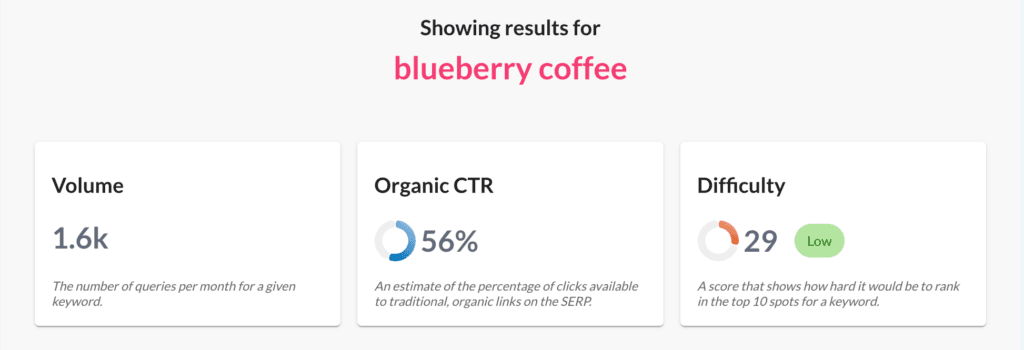
If you know anything about SEO tools, then you’ll know about Moz. They’ve been towards the top of the SEO game for more than twenty years, and they’re still going strong. They offer a near-endless array of valuable SEO features, including Keyword Explorer, which provides insights into top suggestions, monthly volume, organic CTR, and difficulty.
It’s similar in scope to Ahrefs and Semrush, but not quite as expensive. Starter plans run $49 per month, or $39 per month if you pay yearly.
Mangools KWFinder
Mangools says that KWFinder is ‘ the only keyword tool in the universe you will ever need,’ and who are we to disagree? New websites trying to establish themselves will find it especially useful, since the tool excels at providing keywords that have high search volume and low SEO difficulty.
It’s also extremely beginner-friendly. Even if you don’t have a starting keyword (though you should!), you can always use the competitor keyword research feature and see what worked for them. The interface, too, helps to remove virtually all the complexity from conducting research. Just set your research frameworks, hit click, and you’ll get advanced data presented in the simplest of ways.
Also, in addition to being powerful, it’s also affordable, costing just $29. We really can’t recommend it enough.
Analyzing Competitor Keywords
Keyword research would be oh-so-easy if you were the only website using keywords. Alas, you’re not in your own special internet bubble, patiently waiting for customers to input your chosen keywords. You’re in the internet jungle, and that means that you’ll have plenty of competition when it comes to ranking for relevant keywords. Indeed, the sheer number of websites means that it can be difficult to rank even for keywords relating to relatively niche topics.
It would be easier if your competitors ignored keywords and left them all to you, but this is the real world, and that ain’t gonna happen. The fact that your competitors are ahead of you in the SERPs doesn’t mean that it’s game over, however.
It just means that you have to rise to the challenge. And the way you do that is by performing competitor keyword analysis, which is the process of identifying which keywords your competitors are using to earn their high Google ranking.
Why Analyzing Competitor Keywords is Important
Conducting general keyword research is vital for putting your best keyword-laden SEO foot forward. But ranking on Google and attracting your audience doesn’t just depend on what you do. It also depends on what your competitors are doing.
Analysing the keywords they’re using can help influence your own blog keyword strategy. After all, your rivals have clearly done the work to uncover the keywords that will earn the top rankings.
Tapping into that work by performing a competitor’s keywords can save you a huge chunk of time, essentially providing you with a tried-and-tested blueprint for snagging the high rank positions in the search results. It can also be highly effective for coming up with new content ideas. It’s not about stealing their content — don’t do that — but about healthy competition. If you can put together a great blog post using one of their primary keywords, then you might just find that you can outrank them.
How to Do It
OK, so we’ve established that competitor keyword research can hold value. The question is, how do you do it? Happily, it’s a lot easier to perform rival keyword analysis than you might think. It mostly comes down to understanding who your competitors are, using tools to find their keywords, and then challenging them with your own content.
Find Your Competitors
Step one is to find your competitors. That process involves searching on Google for your primary keyword (let’s say, ‘London coffee’), and then making a list of all the websites that appear on the first page. Whether they’re a direct competitor (rival coffee company) or an indirect competitor (non-coffee website that just happened to write about London coffee), they’re all rivals, since they occupy the Google search positions that you want to make yours. With that said, most of your energy should be given to overcoming our direct competitors, since they’re likely targeting the same audience as you are.
Researching Their Keywords
Researching your competitors’ keywords allows you to figure how they earned the Google position you want to occupy.
For that, you’ll need to use a keyword research tool that offers a competitor keyword research feature. Most of them do, in some form or another, though the more powerful (and expensive) tools provide the most comprehensive insights.
In any case, performing this research is usually straightforward. Just input the URL, and you’ll be shown which keywords the site is ranking for. That’s essentially it; the difficulty lies in what you do with the results.
Analysing the Results
Your competitor keyword research should uncover a whole bunch of keywords that your competitor is ranking for. Many of those keywords will likely already be present on your own site.
It’s the ones that you’re not ranking for that are of interest. Some of them, such as brand names, will not be relevant. But you’ll likely find that there are a fair few that you can absolutely swipe for use in your own content. A single newly-unearthed, non-utilised keyword could form the basis of an in-depth blog post, which could help outrank your competitors for that term.
Selecting Keywords: Relevance vs. Volume
Understanding the relevance and volume of keywords is vital for finding success. After all, a keyword with high volume but low relevance might help you to attract an audience, but it’s unlikely that the users it does bring to your website will have any use for what they find there. Remember, it’s not the number of visitors that counts, but the quality of visitors. It’s better to have one hundred highly-engaged visitors rather than 10,000 visitors that leave your site within seconds of arriving.
Choosing the right keywords for your blog posts is, therefore, often about achieving the right balancing act between relevance and volume. Let’s dive into these terms a little closer.
Understanding Keyword Volume
Keyword volume refers to how often a term is searched. High keyword volume means the keyword is searched for a lot, which indicates high traffic potential.
Some high-volume keywords will be impossible to rank for, but that’s not always the case. Some have lower-ranking competition than you might expect.
With that said, it’s also crucial to keep in mind that “high volume keyword” does not automatically equal “better keyword.” You can find just as much success with medium/low volume keywords if they’re well-targeted. Most keyword research tools provide insights into how competitive a particular keyword is.
Understanding Keyword Relevance
Keyword relevance refers to how relevant the keyword is to the content on your site. It’s more important than keyword volume, since both Google and users demand relevancy. Google won’t rank a page for a high-volume keyword if the rest of the content on the page isn’t related to that keyword. Even if that did somehow happen, a user would quickly leave a website if it didn’t find the information they were expecting to find.
Choosing relevant keywords is vital for attracting your ideal visitor and enhancing their experience. It’s also pretty straightforward to do — just ask yourself, is the keyword I’ve chosen for this blog hyper-relevant to its content? If the answer is yes, then you’re in the clear.
How to Balance Keyword Relevance vs. Volume
Balancing keyword relevance and volume can be tricky. On one hand, you’ll probably want to choose keywords with a respectable volume so that you can attract as many visitors as possible. On the other hand, relevance is dynamite. You can only work with keywords that make sense for your content.
You’ll find that using a multi-tier keyword approach works best. This involves choosing a primary keyword that has a decent search volume (let’s say, 300 – 600), and then supplementing that keyword with a few secondary keywords that have a lower search volume (say, 20 – 50). That, combined with hyper relevancy should be the sweet spot.
Optimizing Blog Posts with Keywords
Now that you’ve performed your keyword research, the final piece of the puzzle before hitting the publish button on your blog post is knowing how to use those blog post keywords for maximum effect. This probably goes without saying, but keyword stuffing is no longer relevant (and hasn’t been for a long time). You can’t just throw in your keywords to a blog post and expect results. Actually, that approach will produce results, just not the ones that you want.
We’d argue that knowing how to do keyword research for blog posts is the hard part, or at least the most time-consuming part. Once you’ve got them, following a few handy strategies can help ensure that they deliver the SEO-boosting, audience-attracting impact that helps your website get ahead. Here’s how.
Use Your Keywords Strategically
There are some best practices to follow when placing the keywords in your text. In fact, some of the best positions to use your keyword are outside of the main body of text. Including it in your title, for instance, is an easy way to score points with search engines and your users. It’s also recommended to use your keyword in the meta description, which is the small snippet of text that appears below the title in the SERPs. Finally, including a keyword in the alt-text of any images you include in your post is another easy SEO victory.
OK, so what about within the content itself? Your keywords should be evenly distributed throughout the text, though make sure that your primary keyword is used within the first couple of hundred words.
And while there’s no hard-and-fast rule, it’s generally best to keep keywords to around 1 – 2% of the overall word count. That equates to roughly one keyword per hundred words.
Write For Humans First
This is a big one. Oftentimes, you’ll read content in which the author has been a little too enthusiastic about including keywords into the text. The result is a blog that sounds a little forced and reads unnaturally.
You can understand why bloggers take this approach, but it’s off-putting to users — and for that reason alone, it’s best avoided. There are ways to naturally include keywords without impacting the content’s readability. Write for humans first, not search engines. Google’s bots are smart; if your content is good, they’ll find you!
Don’t Forget the Other SEO-Boosting Techniques
Using the right keywords can go a long way for ensuring that your blogs move up the SERPs and attract visitors, but they can’t do all the heavy lifting on their own. Following the other SEO tips for blogs is also key for maximizing your chances of success.
In addition to keywords, make sure to:
- Use H tags (h1 for titles, h2 for headings, h3 for subheadings).
- Include internal and external links to relevant pages/authoritative domains.
- Optimise the URL to include the target keyword
- Break up the text with images/videos/paragraphs.
- Ensure website loads quickly.
Tracking Keyword Performance
Conducting keyword research can go a long way towards increasing your chances of publishing a blog that lands well with Google and your target audience.
But there are no guarantees. It’s the real-world performance of those keywords that determines whether they’re a success or not, not the quality of the planning. As such, it’s important to track keyword performance once your blog is up and running. In doing so, you’ll open up the possibility of making any changes to your blog posts (if necessary) and get insights that can be used when producing future posts. Here’s how you do it.
Define Your Metric
Including the right blog post keywords can provide a number of varied, different benefits, so choosing the right metric is key to tracking performance. For instance, do you care most about:
- Keyword rankings (how well the post appears in the SERPs)?
- Organic traffic (how many people visit your blog via Google)?
- Engagement (how long visitors spend on the page)?
- Conversions, lead generation, or other business goals?
You can use Google Search Console to track keyword performance, as well as many of the other tools we outlined above, including Ahrefs, Semrush, Moz.
Take a Medium-Term View
It’s easy to be a little too focused and preoccupied with keyword performance. Well-chosen keywords need time to show their worth.
Rather than analysing your keyword performance each day or even weekly, which won’t tell you anything, take a medium-term view. If performance is dipping over a 2 – 3 month period, you can intervene, but before then it’s best to put your keyword selections to the test.
Monitor How Your Visitors Acted Once On The Page
The right keywords can drive good rankings and clicks, but it’s often engagement that counts the most. After all, you want your visitors to do something when they arrive, be it sign up for your newsletter, see the products/services you offer, or simply enjoy the awesome blog post you’ve written!
And that can’t happen if your users are leaving shortly after they’ve arrived, without engaging with your content. The best keywords are the ones that serve your audience’s needs; if it looks like that’s not happening, then it might be an issue with user intent.
If Necessary, Make Changes
Successful keywords can be hard to come by and often require a little bit of trial and error. If you’re not seeing the kind of results you want after a few months, then make some changes. It’s easy enough to edit a post to target a different keyword, and hey, you’re the boss!
Looking for more help making your blogs land a powerful punch with both search engines and audiences? Sign up for BlogCollabs today.