How to Add SEO Keywords in Blogger – Easy Tips

If you’re like a lot of us, you wouldn’t have gotten into blogging so you can start with tactics like search engine optimization (SEO). They just end up becoming a part of it when you want to be taken seriously and start growing your readerbase.
You’ll have something important you want to write about, and you’ll want people to find you online. If you don’t know how to add SEO keywords in Blogger, though, your efforts could be in vain.
It doesn’t matter how much time and effort you put into creating your blog or how important you think the topic will be for people. Making SEO a part of your Blogger toolkit doesn’t need to be overwhelmingly complicated, though.
In this guide, we’ll go through what SEO keywords can do for your blog, best practices for using them, and how you can improve the results you see as time goes on. Let’s take a look.
Understanding SEO Keywords
It’s worth starting with the basics, because your efforts are going to be a little pointless if you don’t know what keywords actually are. SEO keywords are the exact words and phrases people type into search engines when they’re looking for something.
When you use the right keywords in Blogger, you’re telling Google and others that your page is exactly what people are looking for with these keywords. Then there’s the fact there are primary and secondary keywords, which I always thought was an important distinction:
- Primary Keywords – The main phrase you most want your blog post to rank for. If you’re writing about your accounting services, for example, ‘accounting services’ could be your primary keyword.
- Secondary Keywords – These are supporting phrases related to your primary keywords or within the same topic. Under ‘accounting services,’ you could have ‘business accounting services’ and ‘business tax services,’ for example.
Your primary keyword should be your focus, but you should use your secondary keywords to make sure a topic is properly covered while supporting your overall SEO strategy. But, that doesn’t mean just stuffing your blog with your keywords.
One of the biggest mistakes I keep hearing is you need to use your primary keyword X amount of times and your secondary keywords Y number of times. You don’t.
Search intent matters a whole lot more. You’ll need to ask yourself which problems you’re addressing and why people are searching for those specific phrases. When you’re able to answer those, the primary and secondary keywords should fit in naturally. You wouldn’t need to stuff them.
Google and other search engines pay a lot more attention to this than how many times a specific phrase appears in your content. You should, too. When you’ve found the right keywords, you’re in a better position to:
- Identify topics your readers are likely to be interested in and searching for.
- Create a foundation and outline for your blog posts.
- Figure out what kind of information and content would best suit reader needs.
In time, this lets you create content on Blogger that actually turns up in search results and convinces people to click on your post. Naturally, this begs the question as to where you should put these keywords when you’re creating a blog.
Where to Place Keywords in Your Blog
But, that doesn’t mean you should just add keywords anywhere and everywhere to see results. If that worked, we’d just toss them at the end of a post and see SEO gold. It doesn’t work, so we don’t.
You’ll need to put your keywords in the right places for search engines to see your content as high-quality and to send the right signals. Inserting them naturally is one thing, but you’ll have to make sure they’re in the right places.
Blog Title
Your blog title is the first of these. Blogger automatically uses this as the H1 tag, which is the first relevance signal search engines see. Try to include the primary keyword as early as possible in the title, and make sure the title itself is clear and useful for reasons.
For ‘accounting services,’ for example, your title could be ‘How Accounting Services Help Your Business Manage Its Finances.’ It tells Google exactly what the blog’s about while still being useful for readers.
Post URL
Next is the URL. Blogger and similar content management systems normally create this based off of the blog title, but they also let you customize them. We always customize ours. It lets us make sure the URL itself is clear, clean, has the primary keyword, and doesn’t have any unnecessary numbers or characters.
Meta Description
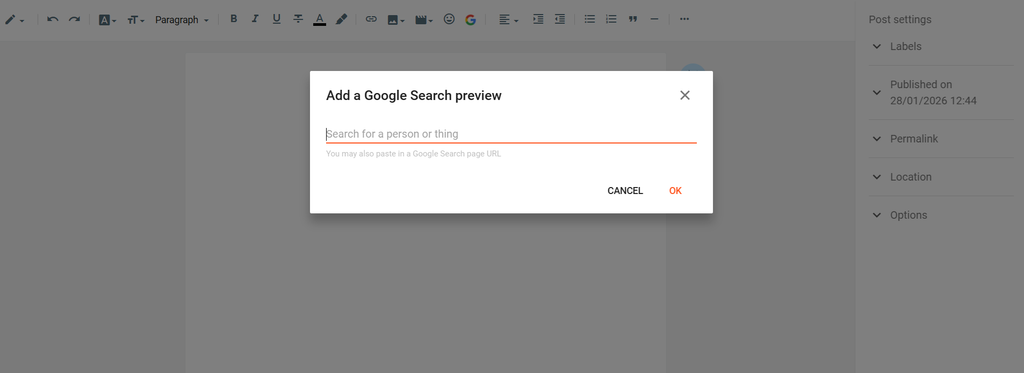
This leads us onto the meta description. While this mightn’t have as direct of an impact on your SEO rankings as the above, it heavily impacts your click-through rates. These can then affect your rankings.
In Blogger, you can find this by navigating to the ‘Add a Google Search Preview’ section. Always include the primary keyword here and keep it to about 155 characters. A great example of this is:
“Professional accounting services let you take the guesswork out of your business finances. Learn how they’ll help your company keep finances under control.”
This shows how relevant your content is while making it more clickable in search results.
Tools for Identifying Effective Keywords
This all makes finding the right keywords essential. If you don’t, you’re probably ranking for the wrong things entirely. You don’t need to settle for guesswork with this, though. You can use several tools to help with it, with a combination of them giving you the best results possible:
- Google Search Suggestions – Open an incognito tab on Google Chrome and start typing something related to what your business offers. The autocomplete functionality here could help you narrow down keywords relatively easily.
- Google Search Console – Once you’ve already published content, Google Search Console is one of the more powerful SEO tools you can use. It shows you opportunities to improve and keywords you already rank for, among other data.
- SEO Blogs & Learning Resources – There are plenty of free SEO resources and courses you can use, like Moz’s Beginner’s Guide to SEO and Ahrefs’ blog. These can help you get to grips with the basics relatively quickly.
When you’re just starting off, these can be invaluable, and free tools, but investing in your keyword research tools always makes sense when you can afford it.

While there are plenty of paid SEO tools out there, some can offer more help than others. And, many of them aren’t too expensive, which could make them great picks when you’re just starting out with your blog. These include:
- Ubersuggest – This helps new sites and inexperienced bloggers find low competition keywords they’ve a better chance of ranking for. It also offers competitor analysis, content gap analysis, and other features to help with your SEO. It’s also one of the more affordable options to go for.
- SurferSEO – Best known for SurferSEO content writing tool, this focuses on content optimization and keyword research and you can also use it to build topical authority. While this can be relatively expensive, it’s a great tool when you’re creating a lot of content.
- SEMrush – SEMrush offers an extensive number of resources and aids, including a free blog and courses. But, the pain SEO toolkit it offers can be one of the better options to go for. There’s no reason why this shouldn’t pay off with your Blogger SEO strategy.
- Answer Socrates – This is great for finding question-based keywords for your blog, and it even gives you up to three free searches a day to get you started. Since the information you get from these reports can be limited, the relatively low cost is more than worth investing in.
There are plenty of other SEO tools for Blogger you can use, both free and paid. And, they’ll each offer their pros and cons, which is why researching and comparing is essential.
You’ll find options that fit your workflow relatively easily, and they shouldn’t take too long to set up and get used to. This could feel a little tricky at the start, but each of your options usually come with various resources to help, and there should be some form of support to help you use them.
Once you’re using the right tool for your needs, finding SEO keywords for your blog should be quick and easy. After that, it’s a matter of using them the right way. This starts with identifying an appropriate topic and then coming up with a name for your blog post.
Let’s take a look at how you can get going with that without feeling overwhelmed.
Writing SEO-Optimized Blog Titles
Your blog title deserves just as much attention as everything else, if not more. It’s how you’ll make a first impression, and you only get one chance at this. But, creating SEO blog titles doesn’t have to be impossible. A few formulae can help, like ‘Primary Keyword + User Benefit or Clarity Modifier’.
In practice, this looks like:
- ‘How Accounting Services Makes Managing Your Finances Easier’
- ‘Finding Accounting Services For Your Business – A Step-by-Step Guide’
- ‘The Benefits of Accounting Services – Making Your Business Finances Manageable’
Taking this approach makes your blog titles relevant to search engines, clear about what’s in your blog, makes natural sense to readers, and encourages people to click through.
But, this often leads to one of the more common SEO mistakes we see; creating clickbait titles. These are headlines that overpromise about what’s in the blog to encourage as many people as possible to click onto the blog itself. This tanks your engagement metrics, as people will then click out of your website.
Known as your bounce rate, this impacts your rankings. It tells Google and others that readers don’t find your content useful, so your rankings drop. It’s vital your SEO blog title accurately reflects what’s inside your blog while being appealing to search engines and readers alike.
It’s a tricky balancing act, but you’ll get there.
Creating Keyword-Rich Headings
This leads right into how you can create keyword-rich headings in your content without them feeling stuffed, too. Headings are used to make your content scannable, more readable, add structure, and signal more relevance to search engines.
But, this only adds to your SEO when they’re done right. Headings in Blogger posts should be used in several ways:
- Using H2s to create major sections.
- Using H3s to break sections down into more specific points.
H4s and onward should be used sparingly, if at all. You can also use variations of your primary or secondary keywords to help with your SEO, too.
If your blog is titled ‘How Business Accounting Services Makes Managing Your Finances Easier,’ for example, an appropriate H2 could be ‘What Accounting Services for Businesses Are & How They Can Help You.’ This offers a variation of your primary keyword while still keeping it natural for readers.
Keep in mind you’ll need to focus on reader intent with this. Each heading should reflect a specific question or concern a reader’ll have. Instead of just having ‘Business Accounting Tips’ as a heading, you could go for ‘Tips to Make Your Business Accounting Less Time-Consuming.’
This helps to give your blog post more structure while sending better SEO signals to Google and other search engines.
Incorporating Keywords into Your Content
And now for the part that many inexperienced bloggers struggle with; incorporating their keywords into their content without it sounding unnatural or awkward. Nobody wants it to be forced, after all.
It’s off-putting to readers, and search engines usually penalise it. You’re better off taking an approach that actually works.
1. Include the Primary Keyword Early
The first 100 words of your blog post are vital for sending all of the right signals. You’ll need to draw readers in while showing them – and search engines – exactly what comes next. This is especially true of your first paragraph, and you’ll have to include your primary keyword here while making sure it’s natural.
One great trick we’ve found with this is leaving your introduction until last so you can summarise the rest of the blog post. It helps make sure the keyword’s included as naturally as possible while making sure the rest of the paragraph makes as much sense as possible.
Avoid forcing this if it doesn’t feel natural. A variation could be an adequate replacement, but you might be better off simply making sure the primary keyword’s in the first 100 words if it doesn’t fit in the first paragraph.
2. Spread Your Keyword Throughout
Just having your primary keyword in your first (or second) paragraph isn’t going to be enough to see the SEO results you want. You’ll need to make sure it’s used across your content. As we’ve already mentioned, though, you’ll have to avoid keyword stuffing with this.
A simple way to do this is making sure it’s included in at least one subheading (either a H2 or H3) and then spreading it naturally across your content. If it feels forced, avoid using it and focus on creating quality content instead.
3. Use Related Terms & Variations
Speaking of fitting everything in naturally, keyword variations and related terms can always be great for this. These can often be your secondary keywords, but they’ll often have a few slight changes, depending on your blog post.
Google (and most other search engines) understand the various nuances and context better than ever. This means you can use:
- Natural Language
- Topic-Related Phrases
- Semi-Related Keywords
Search engines will understand these quite well, helping to give them a more comprehensive understanding of what your content’s about. Plus, they give you opportunities to enhance your SEO efforts without stuffing your content with keywords.
If your primary keyword is ‘business accounting services,’ for example, you can always try a few variations, like:
- Accounting services for businesses.
- Business bookkeeping services.
- Accounting services for small businesses.
These can all send the right relevance signals to search engines without you needing to repeat the same phrase throughout your content. You’re free to use them interchangeably while making sure they’re included naturally.
4. Optimise Your Images With Alt Texts
SEO doesn’t just mean focusing on the words you’re using. You’ll also need to consider the images, too, but don’t just add them and forget about them. You can actually use them to bolster your SEO efforts.
Include a descriptive alt text with each of your images for this. It’ll give you more opportunities to include your primary keyword and related terms, and even having an alt text in the first place is a positive indicator for search engines.
Even when your keywords or variations aren’t included in the alt text, it helps with accessibility for people with vision impairment. Search engines often rank more accessible websites higher than those who haven’t optimised for this kind of accessibility.
Creating descriptive and SEO-friendly alt text doesn’t need to be hard, either. It’s a matter of describing what’s in the image and aiming to include your keyword naturally.
If your image features your professional accounting team, for example, your alt text could be ‘Image showing our business accounting services team in a professional setting.’ Keep it descriptive and relevant while aiming to make it as clear as possible.
When you’re including several images in your blog post, make sure they each have unique alt texts. Using keyword variations is a part of this, especially if you want to avoid it looking like you’re stuffing keywords wherever you can.
5. Use Internal Linking for an SEO Boost
An internal linking strategy is one of the more underutilised SEO tactics in Blogger, but it’s also one of the easiest to take advantage of. When you’ve already published content related to what you’re blogging about, link to it.
This highlights relevant content already on your site, and shows search engines exactly how they’re related. It even helps to increase how much time readers spend on your site, as long as they click through the link and spend time reading that content.
The key here is a keyword-rich anchor text, with your anchor text being the exact words or phrase you’re linking with. This should be related to the primary keyword of the content you’re linking to so you can add as much SEO juice as possible.
If you’re an accountant linking to a page about payroll services, for example, your anchor text could be ‘payroll services for businesses.’
You don’t need to use the exact primary keyword as long as you’re using some variation of it. Each internal link you use helps search engines understand your site structure better and how all of your content is related.
But, this doesn’t mean just linking to anything you can with each blog post. Like keywords, this can be easy to overdo. You’re better off limiting your internal links to anywhere between two and five links, depending on how long your content is.
Prioritise content that drives revenue, like service pages, to make this as profitable as possible while keeping everything natural and boosting your overall SEO.
Monitoring Keyword Performance in Blogs
SEO isn’t just a ‘set-it-and-forget-it’ marketing strategy. You’ll need to work on it consistently for it to have as large of an impact as possible. Regularly publishing new content is a great start with this, but it’s just a start.
You’ll have to track your SEO performance as time goes on and make changes depending on what your Blogger metrics are telling you. SEO and blogging tools like Google Analytics are great for tracking your analytics.
We tend to focus on a few specific areas when optimising for SEO:
- Number of impressions for each keyword.
- The average click-through rate (CTR) per keyword.
- Average search position.
- Engagement metrics like bounce rate and time on-page.
These are helpful in a few ways. They show you exactly which keywords are actually bringing in traffic, for example. You can then double-down on these with content going forward.
If you’re selling products or services through your blog, it’s also worth focusing on conversions and similar sales- and profit-focused keywords. It’ll make sure you’re actually seeing a return on investment with your SEO.
Then there’s the fact you can use key metrics to identify any under-performing content that needs to be worked on. These are often blog posts you’ve already published that need a bit of work to perform better on SERPs.
With a well-planned update, this shouldn’t have to be too hard. An effective approach we’ve seen is:
- Adding missing keyword variations to appropriate H2s and H3s.
- Updating and refining meta descriptions to improve click-through rates.
- Improving internal linking from other posts.
- Expanding sections that are thin or incomplete.
- Updating sections that are out of date or no longer relevant.
Small changes can make more of an impact than you’d first think, especially when you’re making the right tweaks. You don’t always need to give your content a complete overhaul.
Even if your content is a few years old, you can still improve your rankings on search engines once you’ve spent some time making changes. It’s just a matter of monitoring the impact of these changes as time goes on.
Ideally, you’ll see an improvement in your SERP rankings and an increase in your search traffic. This doesn’t always work out as well as intended, though.
If the tweaks and updates don’t lead to as much of an increase as you’d like, it might be a matter of making more changes. A/B testing your SEO keywords, altering your URL, and updating your meta description can all be some of the best ways to do this.
Track one change at a time to see what works best. Once you’ve figured out the right approach with some content, you could replicate the results across your other blog posts, further driving up your SEO results.
Take Action – SEO Blog Keywords Are Your Secret Weapon
Adding SEO keywords in Blogger isn’t hard. But, it does need the right approach and strategy if you actually want to see results with it. Don’t just rely on guesswork and hope for the best with this.
To give your content the best possible chance of being seen, and read, you just need to:
- Pick keywords that carefully match search intent.
- Place your SEO keywords strategically throughout your content.
- Use keywords naturally and in a reader-focused way.
- Analyse your performance and make changes as needed.
This isn’t a process where you can just focus on quick wins. While you’ll often see a short-term boost in performance, SEO is often about the long game.
Avoid taking shortcuts and relying on hacks, as these can hurt you as time goes on. A better approach is to focus on helping search engines place you in front of the right people while providing readers with informative, engaging, and well-written content focused on what they’re actually looking for.
Adding SEO keywords in Blogger is just the tip of the iceberg with this. Relying on internal linking and other SEO tactics for Blogger, implementing H2s and H3s, and similar steps helps search engines understand your content and overall website, further enhancing your SEO efforts.