Yoast Free vs Premium – Which Is Best for Your Blog?

If you run a WordPress blog, there’s a good chance Yoast SEO is already something you’ve already come across. It might be on your list of plug-ins to look into a bit more, or you might already be experimenting with the free version because everyone said it’s something you need on your blog, but you’re not 100% sure what it actually does. You might have even installed it, and it’s just sitting there twiddling its thumbs in the background with a few others you “needed” but aren’t actually using properly.
I completely get it.
You don’t want to waste your money paying for Premium if it doesn’t actually offer you any additional benefits, and you don’t really understand the difference between the Premium and free versions. The question here isn’t really “is Yoast good? (it is)”, But rather: does upgrading to Premium genuinely improve your workflow and results, or is the free version already doing most of the heavy lifting?
Truth be known, Yoast SEO isn’t just a niche add-on you install and forget.
It’s one of the most widely used SEO plugins in the WordPress ecosystem, with over 10 million active installations according to WordPress.org statistics.
This article is going to break that down properly for you. No hype, no blanket recommendations. Just a practical look at features, tools, costs and real-world usefulness so you can decide which option makes sense for your blog.
Overview of Yoast Free Features
Let’s get to it. What do you actually get in the free Yoast version vs the Premium one?
Honestly, you’re not getting a watered-down version of a toy there only to upsell you to the paid-for package like some are.
You do, in my opinion, get a solid SEO toolkit that covers most on-page basics without actually requiring any technical knowledge from you. After all, you have enough to do running a blog, don’t you?
One of the most visible features is the SEO analysis panel that appears underneath your content in the WordPress editor. You can see in the screenshot below of the dashboard that you get four different tabs:
- SEO
- Readability
- Schema
- Social (locked for premium users only)
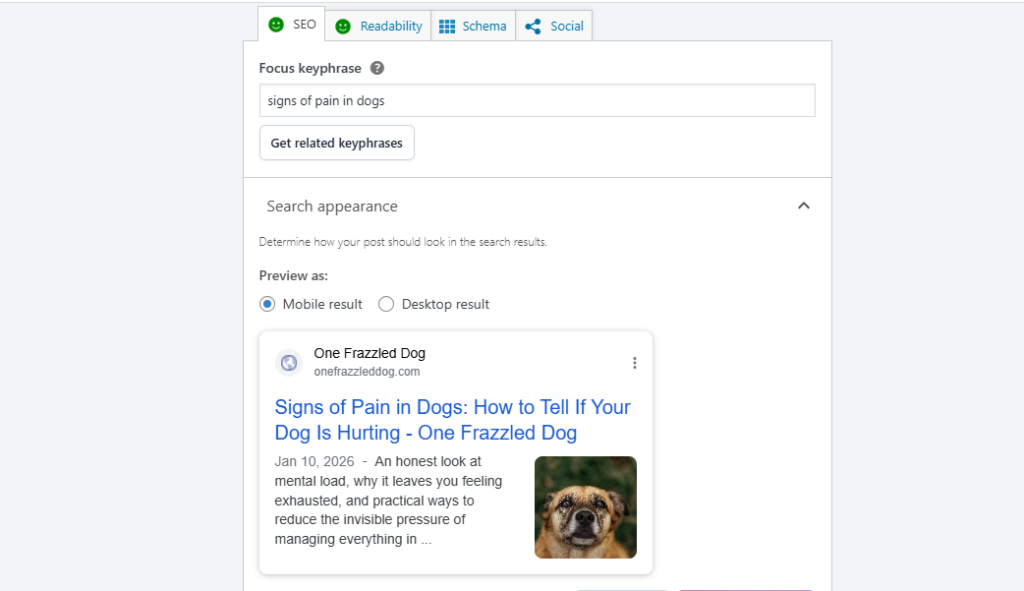
Screenshot courtesy of One Frazzled Dog backend page.
You can see it evaluates your post based on the chosen keyphrase and provides feedback on things like keyword placement, headings, internal links, meta description length and more.
The Yoast website has a pretty detailed breakdown of all of the free features and how their system is designed to guide beginners without overwhelming them. And in practice, the tool does exactly that. It’s not perfect, but what is? It does, however, give structure to your optimisation process.
Moving on to the readability analysis, again, you can see this in more detail in the screenshot. And it’s something people either love or roll their eyes at. But it is really hard to deny its usefulness when used sensibly.
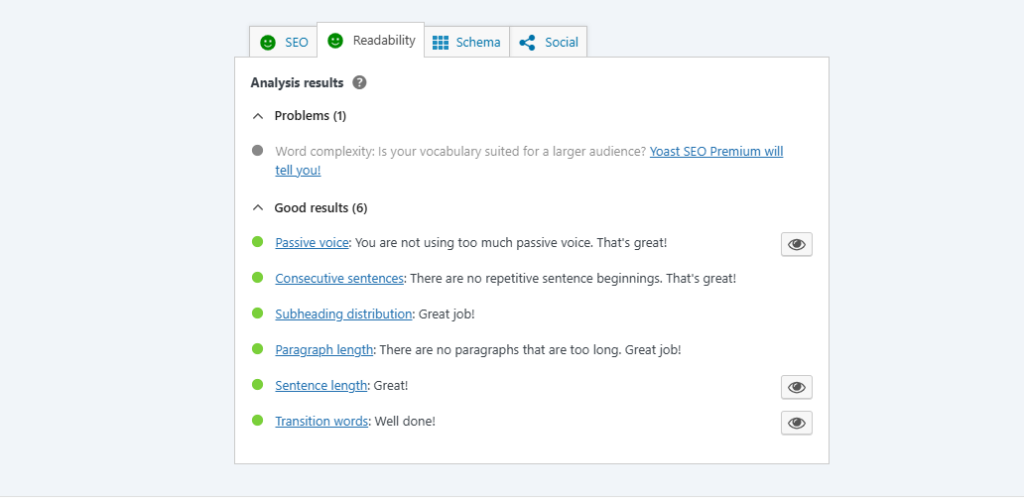
The readability features highlight overly long sentences, excessive use of passive voice, missing transition words, and dense paragraphs. And while these are not direct ranking factors, they do encourage clearer writing, which indirectly supports better user engagement. Plus, when used with judgment rather than being blindly obeyed, it is a great little editing companion.
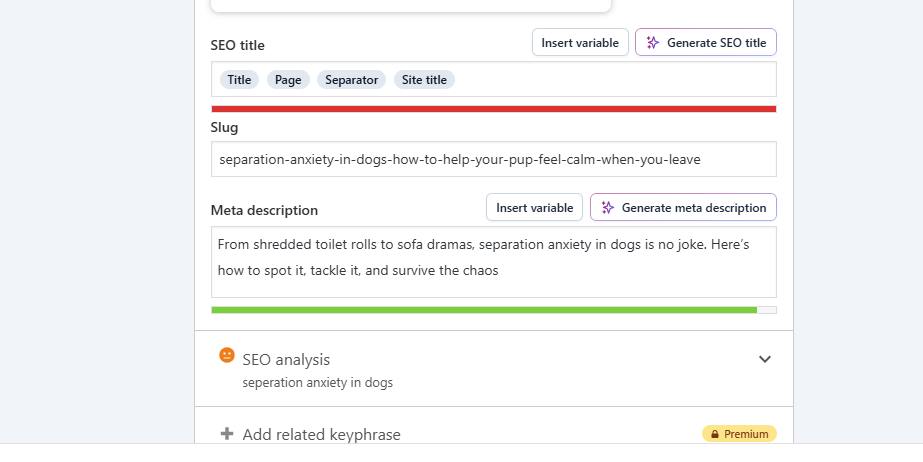
You also get a handy little feature called the Google snippet preview, allowing you to see what your search appearance looks like when your post shows up in Google results — see the above screenshot for reference here.
This is what the reader or user will see. And don’t dismiss it, this can really improve your click-through rates when used correctly, as it forces you to think about how your content looks from the reader’s perspective rather than just in your editor.
Moving beyond content-level features, the free version is much more than what we mentioned above. The free version quietly handles several technical SEO basics, too. It automatically generates XML sitemaps, helps manage canonical URLs to avoid duplicate content issues, and integrates neatly with WordPress without needing constant configuration.
For many casual bloggers, that behind-the-scenes functionality is already more than they could manage manually. For something free, it’s not a bad deal, is it?
I thought you’d agree now!
Benefits of Upgrading to Yoast Premium
I’m going to say this now before we look into the Premium version. When comparing Yoast Free vs Premium, Premium doesn’t replace what you get in the free plugin — it builds on it.
The question here isn’t whether it’s better; it’s whether these additions meaningfully improve your workflow or outcomes.
One of the most practical features of the Premium upgrade is the redirect manager. According to Yoast’s official Premium feature overview, this tool allows you to easily set up 301 redirects when URLs change or when you delete content for any reason, without the need to find a different plugin that can help you.
Basically, this feature is for times when you:
- Update old posts
- Merge content
- Restructure categories
Ever accidentally created a broken link when doing any of these? Guilty as charged, but this feature in Yoast Premium makes mistakes like this less of a risk and more of a simple process.
Screenshot via Yoast Premium page
Moving on from redirects to internal linking. Again, it doesn’t sound overly complicated; after all, you can do this within your editor as you create posts. But for larger sites, this feature becomes much more valuable.
Yoast Premium analyses your content using AI and suggests related posts to link to while you’re editing. And many sites agree that it is one of the biggest workflow advantages for growing blogs, and if I’m honest, I agree.
Internal linking is integral to good SEO, and being able to see at a glance what you should be linking to in a new post is really handy. Because once your library moves past a certain size, remembering what you’ve already published becomes harder, internal linking can slip through the gaps, and opportunities will be missed.
Premium also allows you the option to optimise for multiple keyphrases, not just the one you’re limited to in the free version. It’s not a sign to start keyword stuffing your posts, as it allows for a more nuanced optimisation where a single article naturally targets closely related search terms. And if you’re publishing in-depth content, that flexibility is really useful.
Other Premium additions include the orphaned content filter (this helps you identify which posts have no internal links pointing to them), content insights that analyse commonly used phrasing, removal of backend ads, and access to Premium support. Individually, not exactly a game changer, but together they are part of a stronger toolkit designed specifically for people managing content at scale rather than just publishing the occasional post.
Put simply, the Yoast Premium vs Free plugin doesn’t suddenly make your SEO “better” overnight; it reduces friction. It’s less manual tracking, fewer external tools and fewer things to forget.
Comparison: SEO Tools & Capabilities
You need a side-by-side comparison, or rather an explanation of Yoast SEO Free vs Premium, to really see the reality.
Not just a simple chart of what you get this vs this in each version. That’s too simplified because when you’re using either the free or the Premium version of Yoast, it’s more nuanced.
Starting with the free version of Yoast, it handles on-page SEO fundamentals really well. It allows you to optimise titles, meta descriptions, headings, images and internal links. You can get feedback on structure and clarity, as well as sitemaps and technical support in the background. For a personal blog, this is often plenty to get going with. You get a strong foundation to build from, learn your craft, and implement some SEO basics.
This is something you can easily see in the screenshot below of the free version of Yoast in use on an actual blog. You get the chance to edit and tweak titles and meta descriptions until the traffic light system hits green, as well as your content. It’s detailed enough for beginners and advanced users alike.
Where Premium starts to stand out isn’t in what it replaces. It comes into its own via what it automates or enhances.
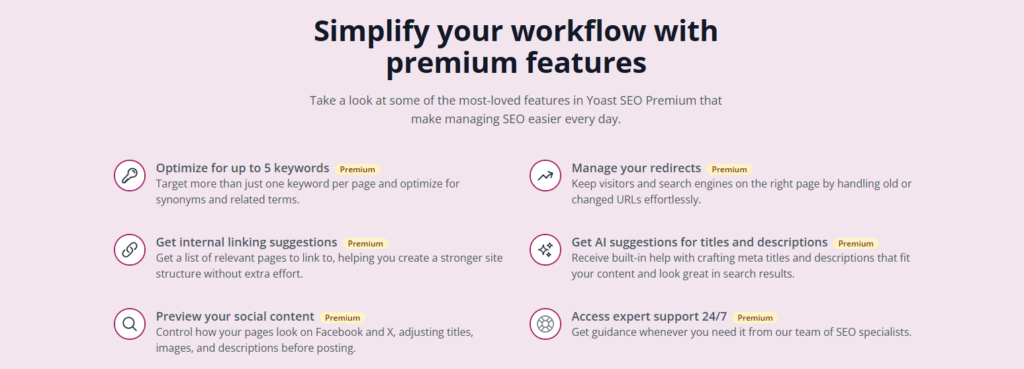
As you can see on the Yoast Premium features page.
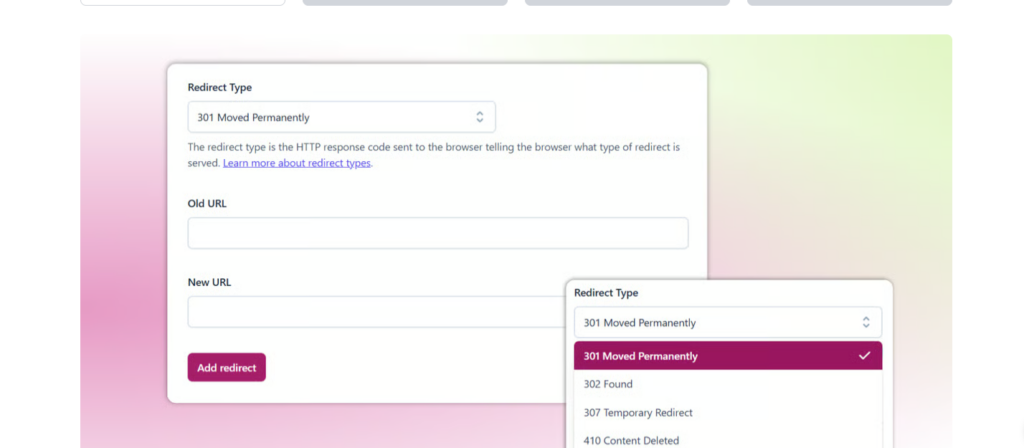
Screenshot via Yoast Premium showing a redirect and the option to easily set it up within the tool.
You get features like the redirect manager, internal linking suggestions, and orphaned content filters. And while these features don’t necessarily change what you do, they do change how easily you can do it more consistently, and that’s the real difference here.
You will notice the difference mostly between different types of blogs; some blogs cope pretty easily with the free version and never need anything more. If you publish once a month and update old content occasionally, you won’t really notice the difference between Yoast Free vs Premium.
But if you manage dozens or even hundreds of pages, this is where the practical difference grows. Updating older URLs becomes less risky. With Premium, you have your redirect manager. You can maintain consistent internal linking and identify weak points in your content structure without it taking copious amounts of time or flitting through filters and insights to get what you need.
Cost Analysis: Free vs Premium
This is the part people are really interested in. The price is how much Yoast SEO Premium vs Free costs. That’s what you’re here for, right — to see the price comparison.
The free version, as you would expect, costs absolutely nothing. It’s not a trial or a limited offer; there is and always will be a free version for people to use, no strings attached. You can use it with as many sites as you wish, with no restrictions on core functionality. And I think this is what makes it one of the best freemium tools out there for bloggers in the WordPress ecosystem.
Yoast Premium, on the other hand, is priced as an annual licence per site. You can pay for this at £9.90 per month, billed annually at £118.80 (ex. VAT).

This will unlock all of the features of Premium for you for 12 months, until your next payment date. There is currently no option for you to pay this on a monthly basis.
If you’re requiring this for multiple sites, the cost can become eye-watering. Because while it’s not overly expensive on its own, you are limited to use on one site only, and for those managing multiple sites, the benefits might not outweigh the cost for all of them.
This is where the talk of cost moves past “is it expensive?” and into “does the cost make sense in context?”
If you have purely a hobby blog and don’t make any money from it, the Premium version might not be right if you’re not planning on moving in this direction for the future. It’s really difficult to justify the expense if you’re not getting anything back from it. The free version already supports what you need and has the features that really matter here.
If your blog directly contributes to your income, this is a different story. If you use affiliate marketing, service products or advertising, the calculation changes. Time saved becomes part of the cost equation, as it should. If Premium features reduce friction, prevent mistakes and make life easier in relation to SEO, the annual fee becomes more reasonable rather than indulgent.
Remember: Yoast Premium isn’t a magic growth lever. It’s a productivity and optimisation tool. If you’re not yet at the stage where productivity is your bottleneck, their free version is likely the smarter financial decision here.
User Reviews and Feedback
You’ll be pleased to know that even reviews around Yoast are refreshingly consistent: people, on the whole, genuinely respect it, even if they don’t love every part of it.
The reason people view it positively is that the free version is especially easy to navigate. The clarity of the tool is something you’ll see crop up in reviews time and time again. It really doesn’t take long to get the hang of using it for the most part.
For users only needing the basics, Yoast hits the spot and helps them understand SEO rather than just automating the process. That user input is valuable for everyone.
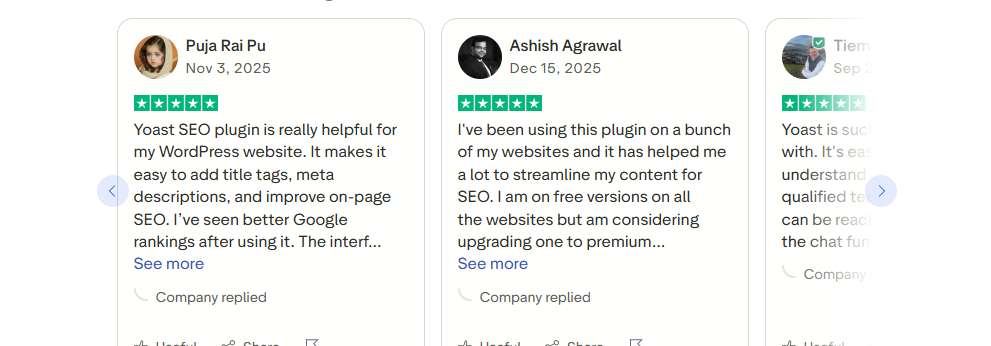
At the same time, there is criticism. Specifically around the Premium features. There are multiple Reddit threads on the topic of whether or not Yoast Premium is actually worth it. Some are taking a hard stance of no, it’s not, while others are actually positive in their experience with the tool.
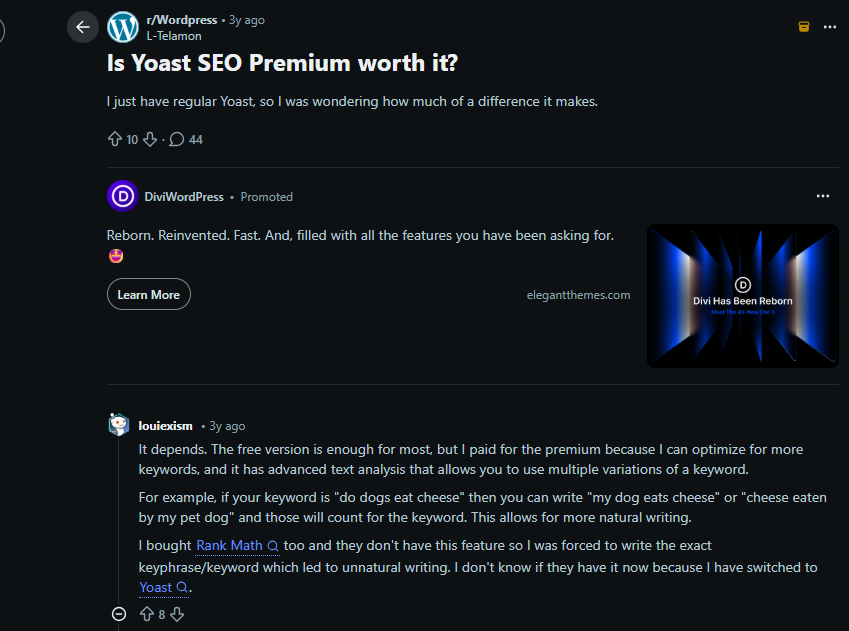
As you can see in the above screenshot, some people point out that features are available on other tools and perform better; others find Yoast better than the devil you know.
But the notable thing is that people aren’t dismissing Yoast entirely. Praise is plentiful for the free version. It’s when you upgrade that the waters get murky, but this is true of anything people have to pay for.
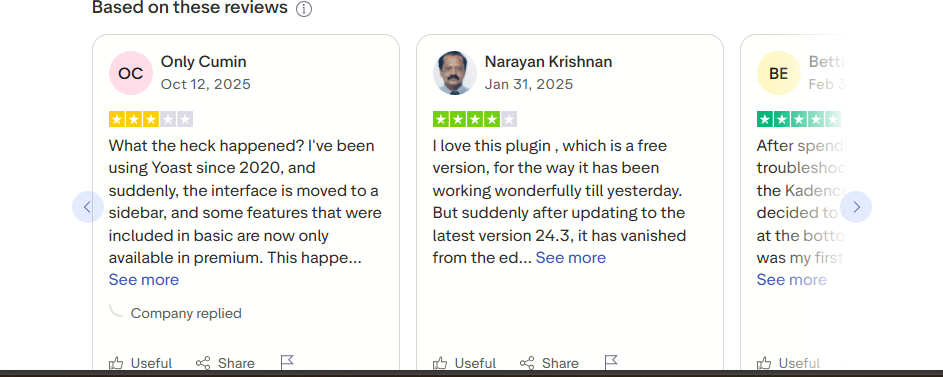
So the takeaway here, as is clearly demonstrated in the screenshots from both Trustpilot and Reddit, is that the feedback is balanced. The free version is definitely worth checking out. The Premium one is only if you need exactly what it offers, but probably not worth investing in if you only have a smaller blog. And this genuinely is a healthy place for a tool like this to sit.
Making the Best Choice for Your Blog
The uncomfortable truth, for some people anyway, is that there’s no universally “correct” answer here. This Yoast review isn’t here to upsell the tool as a “must-have for your blog needs”; it’s also not here to dismiss it entirely and diminish what it does.
The truth is that the right choice depends entirely on how you blog and what you expect your site to do for you.
If you’re just starting out, building confidence with content or blogging for enjoyment, the free version is more than capable of giving you what you need.
If you’re running a growing content site, juggling a large archive or working towards monetisation, Premium is definitely an appealing option. Not because it’s a magic SEO wand, but because it will make your workflow easier and reduce mistakes.
If your blog is part of a business model where time genuinely equals money, the decision to choose Premium becomes more practical. You need tools that reduce friction, speed up workflows and support consistency. And these tools, like Yoast Premium, are often worth paying for.
The most sensible approach is to start with the free version, use it properly, and then consider upgrading once limitations feel like real limitations, not hypothetical ones.
If you’d like more blogging tips, tools and insights like this, you can join the BlogCollabs community by signing up here.